

Import data

From flat / Excel files

Aurélien Ginolhac, DLSM

University of Luxembourg

Monday, the 17th of March, 2025

Learning objectives

You will learn to:

  • Download a data file to a dedicated data sub-folder
  • Learn about tibbles
  • Use readr to import flat-files data into
  • Use the interactive RStudio interface to visualise your data import
  • Use readxl to import excel files into

Importing data

Getting started

  • Represents probably the first step of your work
  • R can handle multiple data types
    • Flat files (.csv, .tsv, …)
    • Excel files (.xls, .xlsx)
    • Foreign statistical formats
      • .sas from SAS
      • .sav from SPSS
      • .dta from Stata
    • databases (SQL, SQLite …)

Tidyverse implementation

  • R base already provides functions for text files
    • read.csv()
    • read.delim()
  • tidyverse redefines these functions:
    • speed
    • characters are not coerced to factors by default (R base neither since >=4.0)
    • generates tibbles

Tibbles

  • Reports the table dimensions (rows x columns)
  • Shows only the first 10 rows.
  • Each column reports its type (dbl, int, lgl, chr, date)
  • Show columns that fits your width (list the rest with types).
  • Have NO rownames

Tip

Use as_tibble() to convert a data.frame to a tibble.

  • dbl: doubles
  • int: integers
  • lgl: logicals (booleans)
  • chr: characters
  • date: dates
  • list: list-column

data.frame vs tibble

Data frame

swiss
             Fertility Agriculture Examination Education Catholic
Courtelary        80.2        17.0          15        12     9.96
Delemont          83.1        45.1           6         9    84.84
Franches-Mnt      92.5        39.7           5         5    93.40
Moutier           85.8        36.5          12         7    33.77
Neuveville        76.9        43.5          17        15     5.16
Porrentruy        76.1        35.3           9         7    90.57
Broye             83.8        70.2          16         7    92.85
Glane             92.4        67.8          14         8    97.16
Gruyere           82.4        53.3          12         7    97.67
Sarine            82.9        45.2          16        13    91.38
Veveyse           87.1        64.5          14         6    98.61
Aigle             64.1        62.0          21        12     8.52
Aubonne           66.9        67.5          14         7     2.27
Avenches          68.9        60.7          19        12     4.43
Cossonay          61.7        69.3          22         5     2.82
Echallens         68.3        72.6          18         2    24.20
Grandson          71.7        34.0          17         8     3.30
Lausanne          55.7        19.4          26        28    12.11
La Vallee         54.3        15.2          31        20     2.15
Lavaux            65.1        73.0          19         9     2.84
Morges            65.5        59.8          22        10     5.23
Moudon            65.0        55.1          14         3     4.52
Nyone             56.6        50.9          22        12    15.14
Orbe              57.4        54.1          20         6     4.20
Oron              72.5        71.2          12         1     2.40
Payerne           74.2        58.1          14         8     5.23
Paysd'enhaut      72.0        63.5           6         3     2.56
Rolle             60.5        60.8          16        10     7.72
Vevey             58.3        26.8          25        19    18.46
Yverdon           65.4        49.5          15         8     6.10
Conthey           75.5        85.9           3         2    99.71
Entremont         69.3        84.9           7         6    99.68
Herens            77.3        89.7           5         2   100.00
Martigwy          70.5        78.2          12         6    98.96
Monthey           79.4        64.9           7         3    98.22
St Maurice        65.0        75.9           9         9    99.06
Sierre            92.2        84.6           3         3    99.46
Sion              79.3        63.1          13        13    96.83
Boudry            70.4        38.4          26        12     5.62
La Chauxdfnd      65.7         7.7          29        11    13.79
Le Locle          72.7        16.7          22        13    11.22
Neuchatel         64.4        17.6          35        32    16.92
Val de Ruz        77.6        37.6          15         7     4.97
ValdeTravers      67.6        18.7          25         7     8.65
V. De Geneve      35.0         1.2          37        53    42.34
Rive Droite       44.7        46.6          16        29    50.43
Rive Gauche       42.8        27.7          22        29    58.33
             Infant.Mortality
Courtelary               22.2
Delemont                 22.2
Franches-Mnt             20.2
Moutier                  20.3
Neuveville               20.6
Porrentruy               26.6
Broye                    23.6
Glane                    24.9
Gruyere                  21.0
Sarine                   24.4
Veveyse                  24.5
Aigle                    16.5
Aubonne                  19.1
Avenches                 22.7
Cossonay                 18.7
Echallens                21.2
Grandson                 20.0
Lausanne                 20.2
La Vallee                10.8
Lavaux                   20.0
Morges                   18.0
Moudon                   22.4
Nyone                    16.7
Orbe                     15.3
Oron                     21.0
Payerne                  23.8
Paysd'enhaut             18.0
Rolle                    16.3
Vevey                    20.9
Yverdon                  22.5
Conthey                  15.1
Entremont                19.8
Herens                   18.3
Martigwy                 19.4
Monthey                  20.2
St Maurice               17.8
Sierre                   16.3
Sion                     18.1
Boudry                   20.3
La Chauxdfnd             20.5
Le Locle                 18.9
Neuchatel                23.0
Val de Ruz               20.0
ValdeTravers             19.5
V. De Geneve             18.0
Rive Droite              18.2
Rive Gauche              19.3


Tibble

as_tibble(swiss)
# A tibble: 47 × 6
   Fertility Agriculture Examination Education Catholic Infant.Mortality
       <dbl>       <dbl>       <int>     <int>    <dbl>            <dbl>
 1      80.2        17            15        12     9.96             22.2
 2      83.1        45.1           6         9    84.8              22.2
 3      92.5        39.7           5         5    93.4              20.2
 4      85.8        36.5          12         7    33.8              20.3
 5      76.9        43.5          17        15     5.16             20.6
 6      76.1        35.3           9         7    90.6              26.6
 7      83.8        70.2          16         7    92.8              23.6
 8      92.4        67.8          14         8    97.2              24.9
 9      82.4        53.3          12         7    97.7              21  
10      82.9        45.2          16        13    91.4              24.4
# ℹ 37 more rows

We lost the province names (rownames of swiss)

Tibbles characteristics

tibbles never use rownames. They are lost unless you assign them to a dedicated column

# library(tibble) or dplyr or tidyverse
as_tibble(swiss, rownames = "Province")
# A tibble: 47 × 7
   Province     Fertility Agriculture Examination Education Catholic
   <chr>            <dbl>       <dbl>       <int>     <int>    <dbl>
 1 Courtelary        80.2        17            15        12     9.96
 2 Delemont          83.1        45.1           6         9    84.8 
 3 Franches-Mnt      92.5        39.7           5         5    93.4 
 4 Moutier           85.8        36.5          12         7    33.8 
 5 Neuveville        76.9        43.5          17        15     5.16
 6 Porrentruy        76.1        35.3           9         7    90.6 
 7 Broye             83.8        70.2          16         7    92.8 
 8 Glane             92.4        67.8          14         8    97.2 
 9 Gruyere           82.4        53.3          12         7    97.7 
10 Sarine            82.9        45.2          16        13    91.4 
# ℹ 37 more rows
# ℹ 1 more variable: Infant.Mortality <dbl>

Other enhancements

  • No characters to factors (R base neither since >=4.0)
  • Colnames can be repaired, "minimal", "unique", "universal", "check_unique", see details

The tidyverse packages to import your data

readr

  • read_csv(): comma separated (,)
  • read_csv2(): separated (;)
  • read_tsv(): tab separated
  • read_delim(): general delimited files, auto-guesses delimiter
  • read_fwf(): fixed width files
  • read_table(): columns separated by white-space(s)

readxl

To import Excel files

  • read_excel()
    • read_xls()
    • read_xlsx()

haven

  • read_sas() for SAS
  • read_sav() for SPSS
  • read_dta() for Stata

Follow along: downloading flat files (= text)

Example: swiss.csv

  • Use a RStudio project
  • Download the swiss.csv file to your project folder, in the sub-folder data
    • Right-click on the link
    • Choose Save Link As
  • You MUST have created a RStudio project
  • Use Finder/Explorer to select this project folder
  • If not present New Folder called data
  • Go inside this sub-folder data
  • Hit Save

It’s always useful to check in your file browser.

Check if file is present and preview it

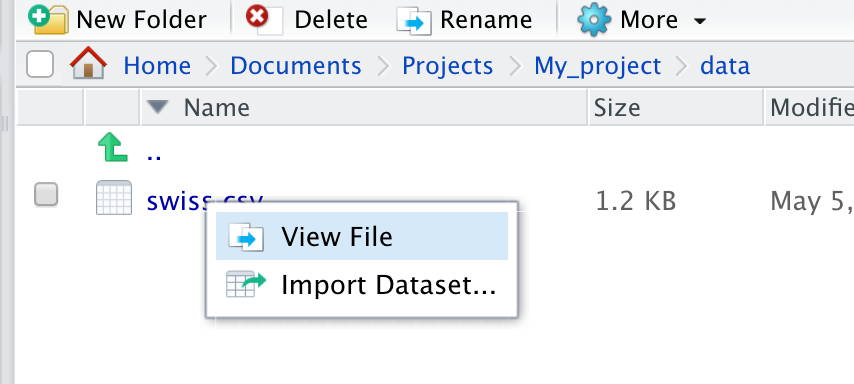
In RStudio:

  • Use the Files panel
  • Go in data and check if swiss.csv is present
  • Click, menu should be:

  • If swiss.csv is present in the data folder
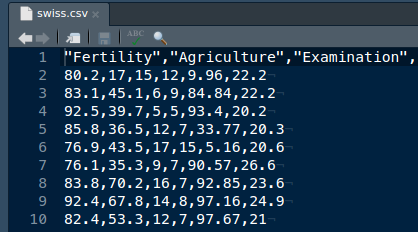
  • You can View File to see its content

  • What is the delimiter?
  • Does it fits the file extension (.csv)?
  • What is the decimal mark?

Follow along: Import the file with read_delim()

The file says .csv but could be wrong

# library(readr) or 
# library(tidyverse)
read_delim("data/swiss.csv")  
Rows: 47 Columns: 6                                                                          
── Column specification ──────────────────────────────────
Delimiter: ","
dbl (6): Fertility, Agriculture, Examination, Educatio...

ℹ Use `spec()` to retrieve the full column specification for this data.
ℹ Specify the column types or set `show_col_types = FALSE` to quiet this message.
# A tibble: 47 × 6
   Fertility Agriculture Examination Education Catholic
       <dbl>       <dbl>       <dbl>     <dbl>    <dbl>
 1      80.2        17            15        12     9.96
 2      83.1        45.1           6         9    84.8 
 3      92.5        39.7           5         5    93.4 
 4      85.8        36.5          12         7    33.8 
 5      76.9        43.5          17        15     5.16
 6      76.1        35.3           9         7    90.6 
 7      83.8        70.2          16         7    92.8 
 8      92.4        67.8          14         8    97.2 
 9      82.4        53.3          12         7    97.7 
10      82.9        45.2          16        13    91.4 
# ℹ 37 more rows
# ℹ 1 more variable: Infant.Mortality <dbl>
# ℹ Use `print(n = ...)` to see more rows

What do we observe with read_delim()?

  • Guesses automatically the field separator: ,
  • Reports the dimensions of the table read
  • Also guessed the column types (all 6 double)
  • Returns a tibble by default

Watch out!

We didn’t assign the tibble to a name!

To do so:

swiss_db <- read_delim("data/swiss.csv")

readr features

  • Column type guessing
  • Delimiter guessing
  • Reporting parsing problems
  • Progress bar
  • Reading from urls
  • Reading compressed files
  • FAST!
  • Column selection
  • Merge multiple files into one tibble

Catch and report reading issues

Toy example with 2 created issues

read_delim("data/swiss_ray.csv")
Rows: 5 Columns: 6                                      
── Column specification ──────────────────────────────────
Delimiter: ","
chr (1): fer
dbl (4): agri, exa, edu, cath
lgl (1): xray

ℹ Use `spec()` to retrieve the full column specification for this data.
ℹ Specify the column types or set `show_col_types = FALSE` to quiet this message.
# A tibble: 5 × 6
  fer    agri   exa   edu  cath xray 
  <chr> <dbl> <dbl> <dbl> <dbl> <lgl>
1 80.2   17      15    12 NA    NA   
2 a      45.1     6     9 84.8  NA   
3 92.5   39.7     5     5 NA    NA   
4 85.8   36.5    12     7 33.8  NA   
5 76.9   43.5    17    15  5.16 NA 
  • Two columns with missing data
  • fer is no longer of type double
  • Empty xray column imported as logical!

Specifying column types

readr record issues, use problems() to see them

sw2 <- read_delim("data/swiss_ray.csv",
        col_types = cols(fer = col_double(),
                         agri = col_double(),
                         exa = col_integer(),
                         edu = col_integer(),
                         cath = col_double(),
                         xray = col_skip()))
sw2
Warning message:                                        
One or more parsing issues, call `problems()` on your
data frame for details, e.g.:
  dat <- vroom(...)
  problems(dat)
problems(sw2)
# A tibble: 1 × 5
    row   col expected actual file 
  <int> <int> <chr>    <chr>  <chr>
1     3     1 a double a      "data/swiss_ray.csv"  

Choosing which columns to read

Lighter column type definitions

We want to skip the wrong 3 columns

And let read_delim guess the agri type (?)

read_delim("data/swiss_ray.csv",
  col_types = cols(fer = "_",  # skip
                   agri = "?", # guess
                   exa = "i",  # int
                   edu = "i",
                   cath = "_",
                   xray = "_"))

Columns selection

  • tidyselect syntax
read_delim("data/swiss_ray.csv",
           col_select = c(agri, edu))
# A tibble: 5 × 2
   agri   edu
  <dbl> <dbl>
1  17      12
2  45.1     9
3  39.7     5
4  36.5     7
5  43.5    15

Column selection with tidyselect

This package is the backend for programatic column selection in the tidyverse.

Features are described in this article.

Operators

  • c() for combining names
  • : for selecting a range
  • - for negating a selection

Helpers

  • everything() all columns
  • last_col() last column

Using patterns

  • starts_with() with quoted prefix
  • ends_with() with quoted suffix
  • contains() with quoted string
read_delim("data/swiss_ray.csv",
    col_select = starts_with("e"), n_max = 1)
# A tibble: 1 × 2
    exa   edu
  <dbl> <dbl>
1    15    12
read_delim("data/swiss_ray.csv", 
    col_select = contains("e"), n_max = 1)
# A tibble: 1 × 3
    fer   exa   edu
  <dbl> <dbl> <dbl>
1  80.2    15    12
read_delim("data/swiss_ray.csv",
      col_select = fer:edu, n_max = 1)
# A tibble: 1 × 4
    fer  agri   exa   edu
  <dbl> <dbl> <dbl> <dbl>
1  80.2    17    15    12

Header, what to do when absent

Example

  • Using the example.csv
  • This CSV toy data contains 3 columns

Content is:

dog,red,1
cat,blue,2
chicken,green,6

Naive approach

exa <- "https://biostat2.uni.lu/practicals/data/example.csv"
read_delim(exa)
# A tibble: 2 × 3
  dog     red     `1`
  <chr>   <chr> <dbl>
1 cat     blue      2
2 chicken green     6

Satisfying?

Provide the header

Read all lines

  • Colnames are self-created
  • show_col_types = FALSE suppresses the verbose mode
read_delim(exa, col_names = FALSE, 
           show_col_types = FALSE)
# A tibble: 3 × 3
  X1      X2       X3
  <chr>   <chr> <dbl>
1 dog     red       1
2 cat     blue      2
3 chicken green     6

Satisfying?

Supply the columns names

read_delim(exa, 
           col_names = c("animal", "color", "value"),
           show_col_types = FALSE)
# A tibble: 3 × 3
  animal  color value
  <chr>   <chr> <dbl>
1 dog     red       1
2 cat     blue      2
3 chicken green     6

Better

Exercise

Override the column types

Import example.csv but

  • Skip the colour column
  • Read in the value column as integer

Desired output

# A tibble: 3 × 2
  animal  value
  <chr>   <int>
1 dog         1
2 cat         2
3 chicken     6

Hints

Column types are specified using col_types = cols()

Function Short Description
col_logical() l TRUE/FALSE, 1/0
col_integer() i integers
col_double() d floating point values
col_character() c everything else
col_skip() **_** skip this column
col_guess() ? guess

Solution

Using one-letter shorcuts

read_delim(exa, 
    col_names = c("animal", "color", "value"),
    col_types = cols(
      animal = "c",
      color = "_",
      value = "i"
    ))
# A tibble: 3 × 2
  animal  value
  <chr>   <int>
1 dog         1
2 cat         2
3 chicken     6

Even more compact

read_delim(exa, 
      col_names = c("animal", "color", "value"),
      col_types = "c_i")
# A tibble: 3 × 2
  animal  value
  <chr>   <int>
1 dog         1
2 cat         2
3 chicken     6
  • Use the single character code in the column order

Skipping lines

Our current example

animal  color value
dog     red       1
cat     blue      2
chicken green     6

Skip one line

read_delim(exa,
  skip = 1,
  col_names = FALSE,
  show_col_types = FALSE)
# A tibble: 2 × 3
  X1      X2       X3
  <chr>   <chr> <dbl>
1 cat     blue      2
2 chicken green     6

Read only 2 lines (w/o header)

read_delim(exa,
  n_max = 2,
  col_names = FALSE,
  show_col_types = FALSE)
# A tibble: 2 × 3
  X1    X2       X3
  <chr> <chr> <dbl>
1 dog   red       1
2 cat   blue      2

Importing Excel files

  • readxl author: Hadley Wickham and Jenny Bryan
  • read_excel() reads both xls and xlsx files and detects the format from the extension. Otherwise:
    • read_xls()
    • read_xlsx()
  • Return tibbles
  • Column type guessing
  • Discovers the minimal data rectangle and returns that, by default
  • Exert more control with range, skip, and n_max
  • excel_sheets() returns the sheet names
  • No external library dependencies, e.g., Java or Perl

Before we stop

You learned to:

  • Appreciate the tibble features
  • Learn set-up working directory with RStudio projects
  • Learn the tidyselect syntax
  • Use readr::read_delim to import your flat files
  • Adjust the imported data types
  • Use readxl to import excel files

Further reading

Acknowledgments 🙏 👏

Development

  • Eric Koncina (initial installment)
  • Veronica Codoni (swiss data set)
  • Roland Krause (readr 2.0 update)

Input and inspiration

  • Jim Hester (vroom, readr development)
  • Jenny Bryan (advice with project organization)
  • Hadley Wickham
  • Nicholas Tierney

Thank you for your attention!